
Arduino Remote Control using Phone Bluetooth.7 - Google Play
You'll be able to see results in few seconds.
Publisher Description
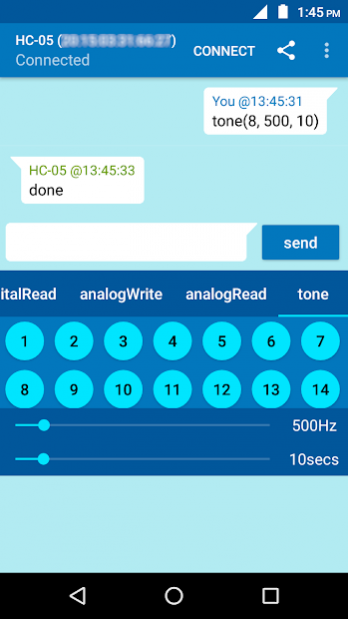
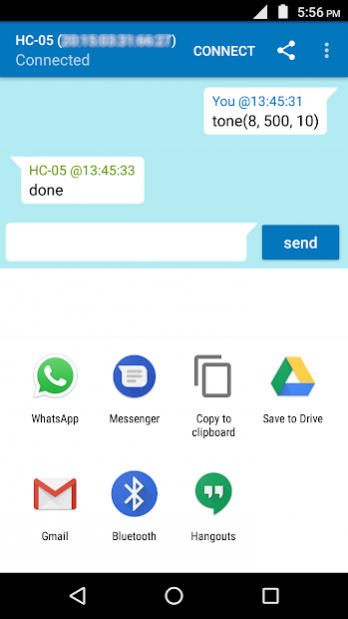
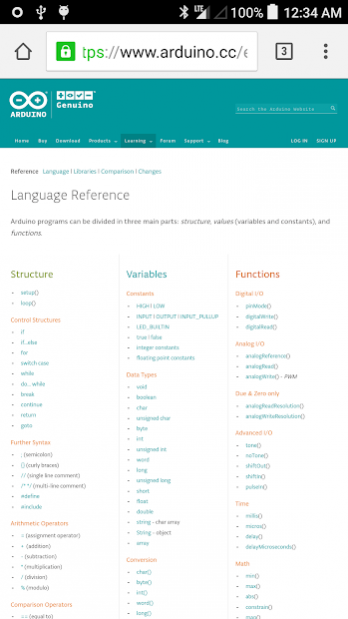
To see how to use this App click
here.
It is tutorial with a sample project. You can use the App for your own projects.
For this App to work you need to put a Arduino sketch in your Arduino device. To download the Arduino Sketch click
here.
Learn various Arduino Commands by Chatting with Arduino. Program and set Arduino Pin functions by sending commands remotely without downloading code.
App is used to program (change pin settings) of Arduino remotely using Bluetooth. You do not need to download programs to change pin settings like pin mode. You can do it remotely using this app.
Its a great tool to learn Arduino in the most fun way by chatting with Arduino.
You can use the sample sketch given here. This sketch can be customized/changed to suit your needs, language and enhance your experience.
[Arduino Sketch]
/******Sketch for App*******/
#include // import the serial library
SoftwareSerial chat(10, 11); // RX, TX
void setup() {
chat.begin(9600);
}
void loop() {
if (chat.available()){
String readStr = "";
readStr=chat.readString();
//pinMode
if(readStr.startsWith("pinMode")){
String pin=readStr.substring(readStr.indexOf("(")+1,readStr.indexOf(","));
int pinNo=pin.toInt();
String mode=readStr.substring(readStr.indexOf(", ")+2,readStr.indexOf(")"));
if(mode=="INPUT"){
pinMode(pinNo, INPUT);}
if(mode=="OUTPUT"){
pinMode(pinNo, OUTPUT);}
if(mode=="INPUT_PULLUP"){
pinMode(pinNo, INPUT_PULLUP);}
chat.println("done");
}
//digitalWrite
if(readStr.startsWith("digitalWrite")){
String pin=readStr.substring(readStr.indexOf("(")+1,readStr.indexOf(","));
int pinNo=pin.toInt();
String value=readStr.substring(readStr.indexOf(", ")+2,readStr.indexOf(")"));
if(value=="HIGH"){
digitalWrite(pinNo, HIGH);}
if(value=="LOW"){
digitalWrite(pinNo, LOW);}
chat.println("done");
}
//digitalRead
if(readStr.startsWith("digitalRead")){
String pin=readStr.substring(readStr.indexOf("(")+1,readStr.indexOf(","));
int pinNo=pin.toInt();
int val=digitalRead(pinNo);
if(val==1){
chat.println("it's HIGH");}
if(val==0){
chat.println("it's LOW");}
}
//analogWrite
if(readStr.startsWith("analogWrite")){
String pin=readStr.substring(readStr.indexOf("(")+1,readStr.indexOf(","));
int pinNo=pin.toInt();
String val=readStr.substring(readStr.indexOf(", ")+2,readStr.indexOf(")"));
int value=val.toInt();
if(pinNo==10 || pinNo==11){
chat.println("You were trying to write on pins which are used by bluetooth RX/TX");// analog write/PWM on pins used by bluetooth can interrupt communication.
}else{
analogWrite(pinNo, value);
chat.println("done");
}
}
//tone
if(readStr.startsWith("tone")){
String pin=readStr.substring(readStr.indexOf("(")+1,readStr.indexOf(","));
int pinNo=pin.toInt();
String frq=readStr.substring(readStr.indexOf(", ")+2,readStr.indexOf(")"));
int frequency=frq.toInt();
String dur=readStr.substring(readStr.lastIndexOf(", ")+2,readStr.indexOf(")"));
int temp=dur.toInt();
long duration=temp*1000;
if(pinNo==10 || pinNo==11){
chat.println("You were trying to write on pins which are used by bluetooth RX/TX");// analog write/PWM on pins used by bluetooth can interrupt communication.
}else{
tone(pinNo, frequency, duration);
chat.println("done");
}
}
//analogRead
if(readStr.startsWith("analogRead")){
String pin=readStr.substring(readStr.indexOf("(")+1,readStr.indexOf(","));
int pinNo=pin.toInt();
int val=analogRead(pinNo);
chat.println("it's " + String(val));
}
}
}
/********end of sketch**********/
About Arduino Remote Control using Phone Bluetooth.
The company that develops Arduino Remote Control using Phone Bluetooth. is ampower. The latest version released by its developer is 7.
To install Arduino Remote Control using Phone Bluetooth. on your Android device, just click the green Continue To App button above to start the installation process. The app is listed on our website since 2018-11-27 and was downloaded 0 times. We have already checked if the download link is safe, however for your own protection we recommend that you scan the downloaded app with your antivirus. Your antivirus may detect the Arduino Remote Control using Phone Bluetooth. as malware as malware if the download link to com.mpawer.arduino.WhatsUpArduino is broken.
How to install Arduino Remote Control using Phone Bluetooth. on your Android device:
- Click on the Continue To App button on our website. This will redirect you to Google Play.
- Once the Arduino Remote Control using Phone Bluetooth. is shown in the Google Play listing of your Android device, you can start its download and installation. Tap on the Install button located below the search bar and to the right of the app icon.
- A pop-up window with the permissions required by Arduino Remote Control using Phone Bluetooth. will be shown. Click on Accept to continue the process.
- Arduino Remote Control using Phone Bluetooth. will be downloaded onto your device, displaying a progress. Once the download completes, the installation will start and you'll get a notification after the installation is finished.
Program Details
System requirements
Download information
Pricing
Version History
version 7
posted on 2018-11-27
*Added Advanced I/O function 'tone' used to generate different tones.
*Added 'Share' button to share chat history using whatsapp, email, SMS, Bluetooth etc. It also gives option to store on Google Drive or other Storage apps.
version 2
posted on 2017-03-07
*Removed 2 minutes restriction of usage and added ads.
*Added Advanced I/O function 'tone' used to generate different tones.
*Added 'Share' button to share chat history using whatsapp, email, SMS, Bluetooth etc. It also gives option to store on Google Drive or other Storage apps.
*Added Star(*) button to rate this app and write short reviews about what you like and what you do not. If you have issues and you do not write we will not be able to serve you better.
Disclaimer
Official Google Play Link
We do not host Arduino Remote Control using Phone Bluetooth. on our servers. We did not scan it for viruses, adware, spyware or other type of malware. This app is hosted by Google and passed their terms and conditions to be listed there. We recommend caution when installing it.
The Google Play link for Arduino Remote Control using Phone Bluetooth. is provided to you by apps112.com without any warranties, representations or guarantees of any kind, so access it at your own risk.
If you have questions regarding this particular app contact the publisher directly. For questions about the functionalities of apps112.com contact us.
